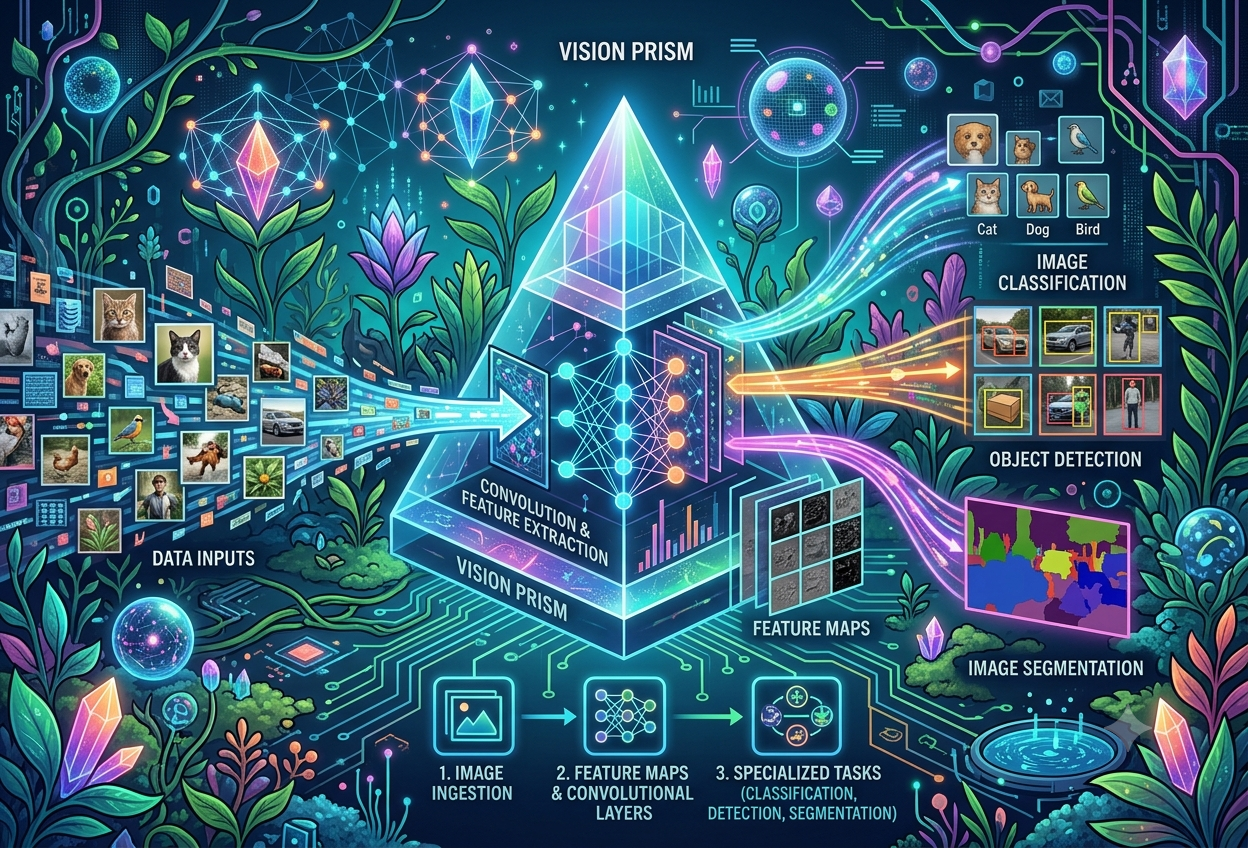
Introduction to Computer Vision
What Is Computer Vision?
Every time your phone unlocks just by looking at your face, or a delivery app shows you’ve “walked out” of a store without scanning anything, a quiet piece of artificial intelligence has just looked at a picture and understood what’s in it. That quiet piece of AI is computer vision.
Computer vision is the branch of artificial intelligence that gives machines the ability to process, analyse, and make sense of visual inputs — photographs, video frames, satellite imagery, X-rays, or anything else that can be captured as an image. Rather than simply storing pixels the way a hard drive does, a computer vision system uses machine learning to pull real, usable meaning out of that visual data: what objects are present, where they are, what they’re doing, and sometimes even what is likely to happen next.
Computer vision doesn’t just let a machine collect pictures. It lets a machine understand what it’s looking at, well enough to act on it.— The Core Idea in One Sentence
Imagine showing a friend a photo of your dog. Without even thinking about it, your friend instantly knows it’s a dog, that it’s brown, that it’s sitting, and maybe even that it looks happy. Your eyes and brain did a huge amount of clever work in that split second — and you never even noticed. Computer vision is the science of teaching a computer to do that same trick: look at a picture and actually understand it, instead of just seeing a meaningless grid of coloured dots.
The Three Things Computer Vision Is Really Doing
Researchers studying computer vision often describe it as the interplay of three connected jobs happening at once: recognition, which identifies people, objects, places, and writing inside an image; reconstruction, which works out the three-dimensional shape and structure of those things from a flat, two-dimensional picture; and reorganisation, which figures out how everything in the scene relates to everything else. A self-driving car doing all three at once might recognise a cyclist, reconstruct roughly how far away and how tall they are, and reorganise that knowledge into the fact that the cyclist is currently in its path.
Identifying what is actually present in the image — objects, people, places, and even handwritten or printed text.
Working out the three-dimensional shape, depth, and physical structure that the flat, two-dimensional image is actually depicting.
Inferring how all the recognised things relate to one another — who is standing where, what is moving toward what.
Computer vision is also one of the oldest branches of artificial intelligence — researchers have been chipping away at the problem of machine sight since the 1950s, decades before deep learning made today’s results possible. That long history matters, because it explains why computer vision today blends genuinely old ideas (edges, shapes, geometry) with cutting-edge deep learning.
How a Picture Becomes Numbers
A computer has no eyes and no imagination. Before any “seeing” can happen, a picture first has to be turned into something a computer actually understands: a large grid of plain numbers.
Every digital image is, underneath the surface, a grid of tiny coloured squares called pixels. Each pixel stores its colour as a set of numbers — typically three numbers for how much red, green, and blue light it represents, often ranging from 0 (none) to 255 (maximum). Stack those three numbers for every single pixel together, and an ordinary photograph becomes nothing more than a giant matrix of numbers, ready for mathematical operations.
Imagine a giant colouring book page made entirely of tiny square tiles, like a mosaic. Each little tile only knows three things about itself: how much red it has, how much green, and how much blue. A computer doesn’t “see” your photo the way you do — it just reads a very, very long list of these three little numbers, tile after tile after tile, until it has gone through the whole picture. Everything computer vision does next is built on top of that long list of numbers.
Why This Matters
Once an image is just numbers, every computer vision task becomes, underneath, a mathematics problem: comparing numbers, multiplying grids of numbers together, averaging neighbouring numbers, and looking for patterns in how those numbers change from one pixel to the next. Edges in a photograph, for instance, show up as places where pixel values suddenly change a lot between neighbours — which is exactly the kind of pattern a computer is very good at spotting.
A Brief History of Computer Vision
Computer vision didn’t appear overnight with deep learning. It has been quietly built up over roughly seven decades, one breakthrough idea at a time.
Cats, Neurons, and the First Clue
Neurophysiologists showed cats a series of images while recording their neural activity, and discovered the animals’ brains responded first to simple lines and edges — suggesting that vision, even biological vision, begins by detecting basic shapes before anything more complex.
Teaching Computers to Digitise Sight
Around the same period, the first computer image-scanning technology emerged, giving computers the basic ability to capture and digitise images in the first place — a necessary first step before any analysis could happen.
Flat Pictures Become 3D Shapes
Researchers achieved an important milestone in teaching computers to transform flat, two-dimensional images into three-dimensional representations of the objects and scenes within them.
The Neocognitron
Computer scientist Kunihiko Fukushima developed a network of artificial cells capable of recognising patterns, naming it the “neocognitron” — a design that included convolutional layers and is widely seen as an early ancestor of today’s convolutional neural networks.
David Marr’s Hierarchical Theory
Neuroscientist David Marr proposed that vision works in stages or layers, and introduced algorithms allowing machines to detect corners, curves, edges, and other basic shapes — a foundational, hierarchical way of thinking about vision that still echoes through modern computer vision systems.
The Focus Shifts
Research attention moved firmly toward image classification and object recognition as the central challenges of the field, setting the stage for the data-hungry deep learning approaches that would soon follow.
ImageNet Arrives
The ImageNet dataset was introduced, containing millions of carefully labelled images — finally giving researchers a dataset large and varied enough to train genuinely powerful computer vision algorithms.
AlexNet Changes Everything
A team from the University of Toronto built the AlexNet convolutional neural network, trained it on ImageNet, and dramatically cut the error rate for image recognition — a result so striking that it kicked off the modern deep-learning era of computer vision that continues today.
Before AlexNet, computer vision systems relied heavily on hand-crafted rules that engineers designed by hand to detect specific shapes or features. AlexNet’s success showed that a deep neural network could instead learn the right features by itself, directly from data — and that single shift in approach is the foundation almost every modern computer vision system, including vision transformers, still builds on.
The Computer Vision Workflow
Building a working computer vision system isn’t one single step — it’s a pipeline, where each stage has to be done carefully or the whole system suffers.
Step 1 — Data Gathering
The process starts with collecting the raw visual material the system will learn from — photographs, video frames, or scans, often pulled from cameras, sensors, or existing public datasets such as COCO, ImageNet, or Open Images, which provide huge libraries of pre-labelled images for training. For a specialised task like detecting pneumonia in chest X-rays, hospitals would instead compile their own dataset of scans, each one carefully labelled by a radiologist as either normal or showing signs of pneumonia.
Step 2 — Preprocessing
Raw images are rarely perfect, so they’re cleaned up first: adjusting brightness or contrast, resizing to a consistent shape, smoothing out noise, or correcting alignment. Because computer vision models also need enough variety to generalise well, engineers often use data augmentation — artificially expanding a dataset by rotating, flipping, or otherwise transforming existing images, so the model sees more variation without needing brand-new photographs.
Step 3 — Model Selection
Different problems call for different architectures. Convolutional neural networks remain the most common choice for analysing single images, while recurrent neural networks are better suited to sequences, such as the frame-by-frame flow of video. More recently, vision transformers have entered the picture, borrowing ideas from language models: an image is chopped into small patches, each patch treated a little like a word in a sentence, and a self-attention mechanism is used to relate the patches to one another. Vision transformers often match or even outperform CNNs on tasks like image classification.
Step 4 — Model Training
The selected model is run repeatedly over the training data, its predictions compared against the correct, ground-truth answers, and its internal settings nudged little by little to make it more accurate over time. The exact mechanics of this stage — for CNNs especially — are worth a closer look, which is exactly where the next section heads.
How a Computer “Sees”: Inside a CNN
Convolutional neural networks, or CNNs, are the workhorse architecture behind most modern computer vision. Understanding their three core layers demystifies almost everything else in this field.
The Convolutional Layer — Finding Features
This is where feature extraction happens: pulling out key visual attributes from raw pixels, such as edges, colours, shapes, and textures. A small grid of weighted numbers, called a filter or kernel, slides — or “convolves” — across the image, calculating a dot product between the filter and the patch of pixels it currently sits over. Each filter is specifically tuned to respond strongly to a particular pattern, so a network can learn many different filters simultaneously, each detecting a different visual cue. The output of running a filter across the whole image is called a feature map or activation map.
The Pooling Layer — Keeping Only What Matters
The feature map produced by convolution is then fed into a pooling layer, which shrinks its size while keeping the most important information. A small window sweeps across the feature map, taking either the maximum or the average value within each group of cells, which retains the strongest signals while discarding redundant detail. This both reduces the amount of computation needed downstream and helps the network focus its attention on the features that matter most.
The Fully Connected Layer — Making the Decision
Once features have been extracted and distilled, the fully connected layer takes over, combining everything learned so far to perform the actual classification task, producing a probability for each possible category — for example, a 92% likelihood that the image shows a cat and an 8% likelihood it shows a dog.
Learning From Mistakes: Loss and Backpropagation
The full left-to-right journey through these layers is called a forward pass. Afterwards, the model checks how far off its prediction was from the true, correct answer using a loss function. To improve, the network runs backpropagation — a backward pass that calculates exactly how much each individual weight in the network contributed to the error — and then applies gradient descent to nudge every weight slightly in the direction that reduces that error. Repeat this forward-and-backward cycle enough times across enough images, and the network gradually becomes genuinely good at the task.
Think of the convolutional layer as a detective with a magnifying glass, sliding it over every inch of a picture looking for clues like edges and shapes. The pooling layer is like a summary-writer, keeping only the most important clues and throwing away the boring bits. And the fully connected layer is the judge, weighing up every clue the detective found and finally deciding: “I’m pretty sure this is a cat!” When the judge gets it wrong, the whole team — detective, summary-writer, and judge — quietly adjusts how it works so it does better the next time. That adjusting is backpropagation.
Computer Vision vs Image Processing
These two terms get mixed up constantly, but they describe genuinely different jobs — and the distinction matters once you start building real systems.
| Aspect | Image Processing | Computer Vision |
|---|---|---|
| Main goal | Alter or enhance an image | Understand and label what’s in an image |
| Typical actions | Sharpening, smoothing, filtering, adjusting brightness | Classifying, detecting, segmenting, recognising |
| Output | A modified image | Information, labels, or a decision |
| Changes the image itself? | Yes, that’s the whole point | Not necessarily — it can leave the image untouched |
Image processing uses algorithms purely to modify an image — sharpening a blurry photo, smoothing out noise, or adjusting its colours. Computer vision is different: instead of changing what an image looks like, it tries to make sense of what the image actually shows, and then carries out some task based on that understanding, such as attaching a label or triggering an alert.
In practice, the two often work as a team rather than as rivals. Image processing might first be used to clean up a noisy or poorly lit photograph, making it easier for a computer vision system to correctly interpret afterwards. Just as often, the order flips: a computer vision system first identifies and locates an object or region of interest, and image processing is then applied just to that specific area for further enhancement or analysis.
Ask yourself: does the output of this step look like a picture, or does it look like an answer? If the result is still fundamentally an image — just sharper, brighter, or differently coloured — that’s image processing. If the result is a label, a count, a bounding box, or a decision, that’s computer vision.
Core Computer Vision Tasks, Part 1
“Computer vision” is really an umbrella term covering a whole family of distinct tasks. The first three — classification, detection, and segmentation — build on each other in a satisfying way, each one asking a more precise question than the last.
Image Classification — “What Is This, Overall?”
Image classification is the broadest and simplest task: predicting a single best-fitting label for an entire image, such as deciding whether a chest X-ray looks normal or shows signs of pneumonia, or whether a photo contains a cat or a dog.
Object Detection — “What’s Here, and Where Exactly?”
Object detection goes a step further, combining two techniques at once: object localisation, which draws a bounding box around each object’s approximate location, and image classification, which labels what each box actually contains. Two architectural families dominate this task: R-CNN (region-based convolutional neural network), which works in two stages — first proposing candidate regions, then classifying and refining each one — and YOLO (“You Only Look Once”), which blends localisation and classification into a single pass through the network, making it fast enough for real-time use, such as live traffic monitoring.
Image Segmentation — “What’s the Exact Shape?”
Image segmentation is a far more precise, pixel-by-pixel version of object detection. Rather than drawing a rough rectangular box, it partitions the entire image into discrete groups of pixels and labels each pixel according to what it belongs to — making it ideal for cases where objects overlap closely and a simple bounding box would be ambiguous.
The simplest type: every pixel is assigned a category label, but objects of the same category are not told apart from one another. Two parked cars next to each other might be treated as one continuous “car” region.
Predicts the exact pixel-level boundary of every individual object, even when multiple objects share the same category — so those same two parked cars are now correctly separated into two distinct shapes.
Combines both approaches at once: every pixel in the image gets a category label, and every individual object instance is also distinguished — giving the most complete picture of all three segmentation types.
Core Computer Vision Tasks, Part 2
Beyond classification, detection, and segmentation lies a further family of tasks that push computer vision into tracking, understanding, identity, motion, and even creativity.
Follows a specific object across a sequence of video frames, preserving its identity and continuity as it moves — essential for traffic monitoring and surveillance.
Goes beyond naming individual objects to infer relationships between them — that a taxi is moving in front of a car, or a pedestrian is about to cross a road.
Applies image recognition specifically to faces, mapping key measurements like eye spacing and jaw contour — the basis of unlocking a phone just by looking at it.
Tracks the spatial position of body parts to read gestures and movement — used everywhere from virtual reality games to NASA’s robotic arms aboard the International Space Station.
Extracts and converts printed or handwritten text from images into machine-readable text, automating the digitisation of documents and forms.
Creates entirely new images using generative models such as diffusion models, GANs, or variational autoencoders, rather than just analysing existing ones.
Automatically spots defects and flaws — corrosion on a bridge, a faulty solder joint on a circuit board — faster and more consistently than a human inspector.
The broadest underlying task of all: simply identifying the people, objects, places, or writing present in an image, forming the foundation that the other tasks build upon.
A Closer Look: OCR’s Three Steps
Optical character recognition follows a tidy three-step process. First, image acquisition converts the source image into a clean black-and-white version, marking light areas as background and dark areas as potential characters. Second, preprocessing removes stray pixels and corrects for any skew introduced during scanning. Third, text recognition examines one character at a time, matching its font, scale, and shape against known templates — and more advanced systems can recognise whole words at once for faster processing.
A Closer Look: How Image Generation Models Differ
Diffusion Models
Learn to “denoise” images that were deliberately scrambled with random noise during training, then reverse that process to generate brand-new images from pure noise.
Generative Adversarial Networks
Pit two networks against each other — a generator that creates fake images and a discriminator that tries to spot the fakes — improving both until the fakes become convincing.
Variational Autoencoders
An encoder compresses images into a compact representation, and a decoder then reconstructs new variations of images from that compressed form.
Vision-Language Models
Pair large language models with vision transformers, allowing images to be generated directly from a written text description, or described in natural language.
Pros, Cons & Challenges
Computer vision is powerful, but it is not magic. It brings genuine, measurable advantages, alongside a set of well-known weaknesses worth understanding before relying on it.
✓ Advantages
- Fast processing: Analyses images and video far faster than a human, which matters enormously for real-time tasks like surveillance or driving.
- Consistent performance: Never gets tired, bored, or distracted — ideal for repetitive jobs like quality inspection on a production line.
- Scales easily: Can process thousands of images a minute, a volume no human team could realistically match.
- High accuracy: Achieves precise, repeatable results on well-defined tasks such as object detection and medical image analysis.
✗ Challenges
- Lighting issues: Shadows, glare, and sudden brightness changes can meaningfully reduce accuracy.
- Occlusion problems: Objects that are partially hidden or overlapping are genuinely difficult to detect reliably.
- Noise and clutter: Busy, distracting backgrounds can confuse even well-trained systems.
- Data dependency: Needs large amounts of clean, correctly labelled training data — poor data quality directly causes poor results.
A computer vision system is a bit like a very fast, very tireless helper who never gets bored counting things or checking for mistakes — but who can still get confused if the lighting is weird, if something is half-hidden behind another object, or if it was never shown enough good examples to learn from in the first place. It’s brilliant at the things it has practised a lot, and still clumsy at things it hasn’t seen much of.
Where the Two Sometimes Disagree: Vision vs Human Vision
Human vision is shaped by millions of years of evolution and a lifetime of lived experience, which lets people recognise a completely new object after seeing it just once or twice, using context and common sense to fill in the gaps. Computer vision, by contrast, typically needs to see many labelled examples of something before it can recognise it reliably, and it has no built-in common sense to fall back on — but in exchange, it never gets tired, never blinks, can watch dozens of camera feeds simultaneously, and can be copied and deployed at a scale no human team ever could.
Real-World Applications
Computer vision has matured well beyond research labs — it now quietly runs in the background of agriculture, healthcare, retail, manufacturing, transport, and even outer space.
Agriculture
Drones and satellites capture high-resolution images of crops, which computer vision then analyses to assess plant health and flag pests or weeds for targeted treatment.
Autonomous Vehicles
Cameras, lidar, and radar combine to build a 3D model of the surrounding world, while object detection, segmentation, and scene understanding handle safe navigation around pedestrians, lanes, and traffic signs.
Healthcare
Object detection helps locate possible markers of disease in X-rays, CT, MRI, and ultrasound scans, while instance segmentation outlines the precise boundaries of organs, tissues, and tumours.
Manufacturing
Powers inventory tracking and real-time quality control, flagging defects on a production line faster and more consistently than inspectors relying on their own eyes.
Retail & E-Commerce
Enables checkout-free shopping experiences and virtual try-on tools that let customers preview how clothes, eyewear, or makeup will look before buying.
Robotics
Lets robots map their surroundings and complete tasks such as assisting in surgery, navigating warehouses, or picking only the ripest produce on an assembly line.
Smart Cities
Monitors traffic intersections to improve flow and safety, and scans roads and bridges for potholes or cracks that need repair crews dispatched.
Space Exploration
Helps spacecraft detect and avoid landing hazards, lets rovers navigate unfamiliar terrain, and classifies asteroids, meteors, and debris while tracking their trajectories.
“Almost every industry that deals with a camera, a scanner, or a screen now has a computer vision system quietly watching, counting, or checking something in the background.”
— A Practical Way to Think About How Widespread This Field Has BecomeTools, Frameworks & Where Models Actually Run
Behind every computer vision application sits a toolkit of libraries for building it, and a real decision about where the finished model should physically run.
Popular Tools & Libraries
One of the most widely used computer vision libraries, with more than 2,500 algorithms covering image processing, object detection, and video analysis. Written in C++, with wrappers for Python and Java.
Google’s open-source machine learning platform, offering computer-vision-specific datasets and ready-made functions for classification, segmentation, and detection.
Part of the PyTorch ecosystem, bundling common image transformations, datasets, and pretrained models for classification, detection, and segmentation.
A deep learning API that runs on top of frameworks like TensorFlow and PyTorch, offering accessible tutorials for tasks including OCR and image segmentation.
An open-source, Python-based collection of image-processing algorithms, valued for its simplicity and accessibility to newcomers.
Specialised processors that dramatically speed up the heavy mathematics involved in training large computer vision models with many parameters.
Cloud Training, and Cloud or Edge for Running the Model
Training a computer vision model — the expensive, compute-hungry stage of learning from data — most commonly happens in large data centres or cloud environments, where GPUs and AI accelerators can handle the sheer number of calculations involved. Once trained, however, the finished model needs somewhere to actually run, known as inference, and that’s where a real choice opens up between the cloud and the edge.
✓ Running in the Cloud
- Access to far greater computing power for complex models
- Centralised, simpler to update and monitor
- Good fit when network connectivity is reliable
✗ Running at the Edge
- Lower latency — faster real-time response
- Less data sent over the network, easing bandwidth costs
- Keeps sensitive data local, helping with privacy rules
- Still works reliably even with poor or no internet connectivity
Teams building new computer vision solutions increasingly start from an existing, off-the-shelf foundational model and fine-tune it for their specific need, rather than training an entirely new model from zero. This dramatically shortens development time and avoids re-learning visual basics — such as edges, shapes, and textures — that have effectively already been solved by earlier, larger training efforts.
The Road Ahead
Computer vision has travelled an enormous distance — from cats blinking at simple lines in a 1950s laboratory to cars that read road signs on their own. The road ahead looks just as eventful.
As transformer-based architectures continue to mature, they are increasingly matching or surpassing CNNs on demanding tasks, while borrowing techniques first proven in language models.
Vision-language models are blurring the line between “seeing” and “describing,” letting systems generate natural-language descriptions of a scene or generate entirely new images from a written prompt.
As edge hardware becomes more capable, expect more computer vision inference to move out of the cloud and directly onto cameras, vehicles, and embedded devices.
Techniques like transfer learning and fine-tuning continue to reduce how much labelled data and compute is needed to build a capable, specialised computer vision system.
Computer vision is, at its heart, the project of turning a flat grid of pixel numbers into genuine understanding: what is here, where is it, and what does it mean. Every task covered in this guide — classification, detection, segmentation, tracking, recognition, generation — is simply a different, more specific question being asked of that same underlying grid of numbers. Once that core idea clicks, the entire field becomes a great deal easier to follow, no matter how advanced the latest model architecture happens to be.
Sources & Further Reading
In-depth explainer covering the three R’s framework, CNN mechanics, tasks, applications, tools, and history.
Concise overview of key concepts, workflow, tasks, techniques, advantages, and challenges.
Academic-style introduction to computer vision fundamentals and career applications.
Practitioner-style deep dive into computer vision concepts and techniques.
Business-oriented explainer on computer vision and its operational use cases.
Industry resource discussing computer vision applications in document processing.
Covers use cases, the computer-vision-vs-image-processing distinction, and core tasks.
Broader tutorial hub covering image processing, feature extraction, and deep learning for vision.
Industry blog covering computer vision fundamentals and business applications.
Beginner-friendly explainer aimed at data science learners.
Practitioner’s perspective connecting machine learning techniques to computer vision practice.
Conceptual overview of computer vision aimed at AI practitioners.
Technical explainer connecting computer vision tasks to underlying machine learning methods.
Knowledge-base article covering computer vision basics from a cloud-services perspective.
Covers CNN fundamentals, training infrastructure, industry applications, and cloud vs edge deployment.
Academic reference aggregating computer vision research definitions and context.
The academic paper establishing the recognition, reconstruction, and reorganisation framework.
The original paper introducing the ImageNet dataset that powered the deep learning era of computer vision.
The original paper describing the neocognitron, an early precursor to convolutional neural networks.
The paper introducing vision transformers, applying transformer architectures to image classification.