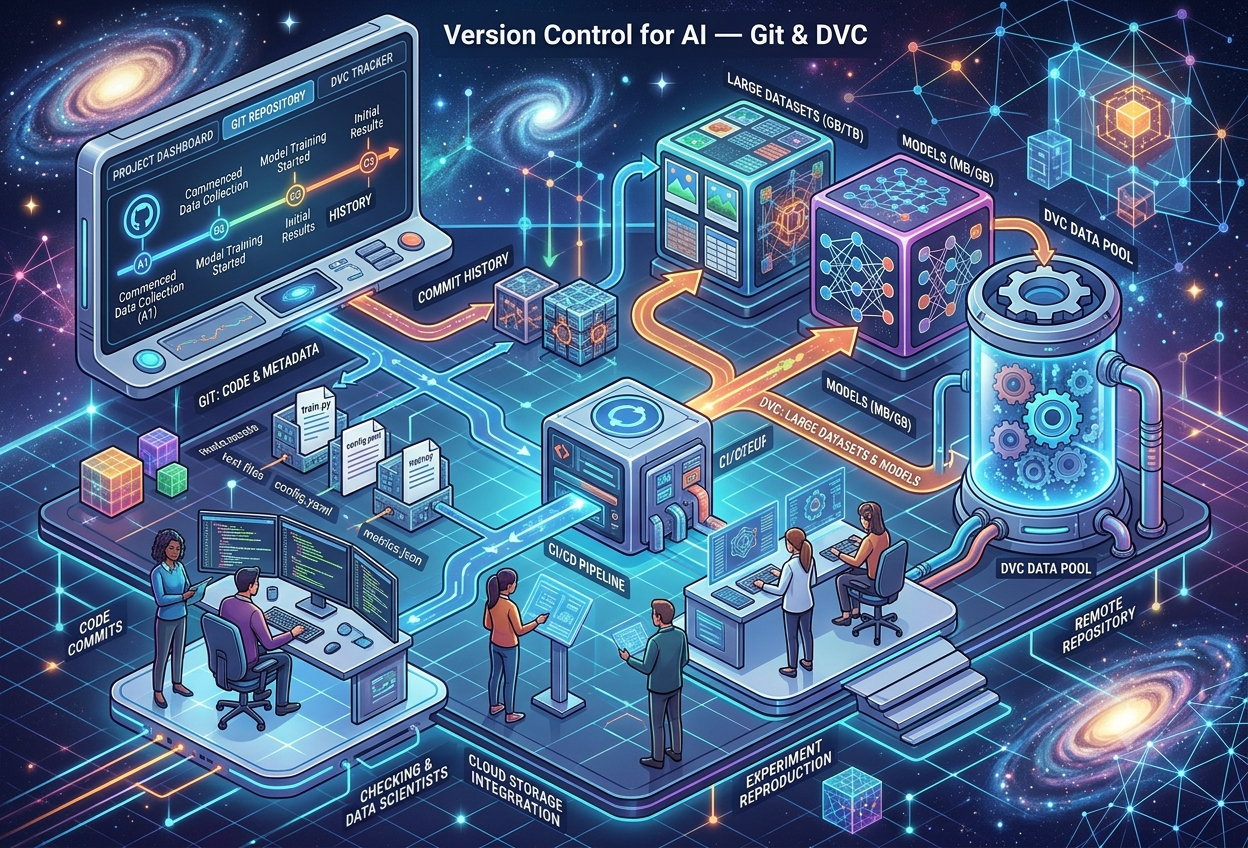
Version Control for AI — Git & DVC
What Is Version Control?
Imagine you are writing a school essay, and every single time you make a change, you save it as a brand-new file: “essay.doc”, “essay_final.doc”, “essay_final_v2.doc”, “essay_final_v2_REAL.doc”. A week later, you cannot remember which file actually has the good ending you wrote on Tuesday. Now imagine a team of people all editing that same essay at once, on their own computers, and somehow needing to combine everyone’s changes into one correct version. That chaos is exactly the problem version control was invented to solve.
Version control is a system that automatically keeps a complete history of every change made to a project — who changed what, when they changed it, and why — so that anyone can go back in time to any earlier version whenever they need to. Instead of dozens of confusingly named files, there is just one project with a full, searchable timeline of everything that ever happened to it.
“Code has Git. Data has DVC.”— a popular way engineers summarize this entire topic
In ordinary software projects, the most famous version control tool by far is Git — a free system that tracks changes to text-based files like program code. Git has been the backbone of software engineering for years. But machine learning projects are not just code. They also involve enormous datasets, trained model files, and a constant stream of experiments — and that is where the story gets more complicated.
Think of version control like a magical notebook that remembers every single draft of your drawing, automatically, the moment you finish each one. You never have to write “draft 1,” “draft 2,” or “the real final one” ever again — the notebook already knows the order, and you can flip back to any page instantly.
Why Machine Learning Makes This Harder
A typical ML project has several moving parts that all change at different speeds and in different ways:
The scripts that load data, train models, and evaluate results — small text files, perfect for Git.
The raw and processed datasets a model learns from — often huge, binary, and updated as new data arrives.
The trained model files and the settings used to create them — also large, and produced again and again during experimentation.
The central challenge of this entire guide boils down to one sentence: a machine learning result is only as reproducible as the weakest-tracked piece behind it. If you can perfectly version your code but have no idea which exact dataset trained last month’s best model, you cannot truly reproduce, trust, or improve on that result.
Git: A Quick Refresher
Before going further into DVC, it helps to remember exactly what Git does and why it became the default version control tool for almost all software on Earth.
Git works by taking little “snapshots” of a project every time you tell it to, called commits. Each commit records exactly what every tracked file looked like at that moment, along with a message describing what changed and why. Over time, this builds a complete, browsable timeline of a project’s entire life.
The Everyday Git Vocabulary
| Term | What It Actually Means |
|---|---|
| Repository (“repo”) | The folder Git is watching, plus its entire saved history |
| Commit | A saved snapshot of the project at one point in time, with a message |
| Branch | A separate, parallel line of work that can later be merged back in |
| Clone | Making a full local copy of a remote repository, history included |
| Push / Pull | Sending your commits to a shared remote, or fetching others’ commits |
| .gitignore | A list of files Git should deliberately not track |
Git is brilliant at this job specifically because the files it was designed for — source code — are small, plain text, and easy to compare line by line. That is precisely the assumption that starts to break down the moment machine learning enters the picture, which the next section explores.
A Git repository is like a photo album that takes a picture of your entire LEGO castle every time you ask it to — not just one brick, but the whole castle, labeled with the date and a little note like “added the tower!” Flip back any number of pages, and you’ll see exactly how the castle looked at that moment.
Why Git Struggles With AI Projects
Git was built in 2005 to track the Linux kernel’s source code — millions of lines of small text files. Machine learning throws three things at Git that it was never designed to handle gracefully.
Problem 1 — Binary Files Bloat the Repository
Git is exceptionally good at storing the difference between two versions of a text file — it can store just the few lines that changed, not the whole file again. A trained model file (such as a .h5, .pt, or .pkl file) or a dataset is usually binary, meaning Git cannot meaningfully compute a small difference between two versions. Every tiny change forces Git to store an entirely new multi-gigabyte copy, and the repository balloons in size with every single commit.
Problem 2 — Hosting Services Cap File and Repo Sizes
Most Git hosting services impose hard limits precisely because of this binary-file problem. GitHub, for example, strongly discourages files over 100MB and enforces an upper limit on total repository size. A single modern training dataset or a large language model’s checkpoint file can blow past these limits in an instant.
Problem 3 — Reproducibility Needs More Than Code
Even if file size were not an issue, there is a deeper problem: a model’s behavior depends on its code and on the exact dataset it was trained on and on the hyperparameters chosen for that run. Git alone can tell you which version of train.py was used last Tuesday — it cannot tell you which version of the 40GB dataset folder sitting on someone’s hard drive was used at the same time, unless that link is captured somewhere too.
A model is retrained. Its accuracy mysteriously drops. Nobody can say for certain whether the data changed, the preprocessing changed, or the model code changed — because only the code was actually being tracked. This single, common scenario is the reason data versioning exists as its own discipline.
Git is like a librarian who is amazing at keeping track of which exact page of a storybook changed between editions — but completely unequipped to also track the box of LEGO bricks, the bag of paint, and the recipe ingredients sitting next to the book, even though all three together are what actually made the finished project.
Git LFS: The First Patch
Before DVC existed, the software world’s first attempt to fix Git’s large-file problem was a tool called Git LFS (Large File Storage), and it is still worth understanding because many teams still use it today.
Git LFS works by replacing a large file inside the repository with a small text pointer — essentially a note that says “the real file lives somewhere else, and here’s its unique fingerprint.” The real, heavy file gets stored on a separate LFS server, while Git itself only ever has to track that tiny pointer file. This keeps the main repository lightweight even when the project includes large trained models.
# Turn on LFS tracking for this repository
git lfs install

# Tell Git LFS which file types to treat specially
git lfs track "*.h5"

# From here on, this behaves like a normal Git workflow
git add model.h5
git commit -m "Add trained model"
git push
Where Git LFS Falls Short for ML
Git LFS solves the file-size problem reasonably well, but it was built with general large files in mind — design assets, videos, audio — not specifically for the way machine learning teams actually work. It does not understand datasets as a distinct concept, has no built-in idea of an ML pipeline (the connected steps from raw data to a finished model), and offers no experiment-tracking features at all.
✓ What Git LFS Does Well
- Keeps large binary files out of the main Git history
- Uses familiar Git commands — add, commit, push
- Works for any kind of large file, not just ML
- Widely supported by major Git hosting platforms
✗ Where It Falls Short for ML
- No concept of ML pipelines or reproducible stages
- No built-in experiment tracking or metric comparison
- Requires special LFS-aware servers on the hosting side
- No native support for cloud buckets like S3 or GCS
This gap — a tool that handles big files but understands nothing about datasets, pipelines, or experiments — is exactly the opening that DVC was built to fill, and it is where the rest of this guide is headed.
Enter DVC: Git’s Cool Cousin
DVC stands for Data Version Control. It is a free, open-source tool, written in Python, that was created in 2017 by Dmitry Petrov and the team at a company called Iterative.ai, specifically to close the gap that Git and Git LFS left open. Since then it has grown into a project with well over a hundred contributors and thousands of users, and it has been adopted by data teams at organizations ranging from small startups to large, well-known technology companies.
“DVC is like Git’s cool cousin who can really handle your 50GB datasets and billion-parameter models.”— a common way the tool gets introduced to newcomers
The core idea behind DVC is refreshingly simple: it does not try to replace Git — it works alongside it. Git keeps doing exactly what it already does best (tracking code). DVC takes on the job Git was never good at: tracking large datasets and model files, while storing only a tiny pointer inside the actual Git repository.
dvc add, the real data moves into a local cache (and later remote storage), while a lightweight .dvc pointer file — small enough for Git — takes its place in the repository.What DVC Can Do
Track every version of a dataset over time, the same way Git tracks code, without bloating the repository.
Define the connected stages of an ML workflow — preprocessing, training, evaluation — so they rerun reproducibly.
Compare metrics, parameters, and plots across different runs without leaving the familiar Git workflow.
Tag, organize, and share the lifecycle of trained models in an auditable, versioned way.
Imagine your school keeps one giant, official trophy case (that’s Git) but it only has room for little name tags, not the actual trophies. DVC is the warehouse next door that stores all the real, heavy trophies — and each name tag in the case simply says exactly which shelf, in which warehouse, holds the real thing.
How DVC and Git Work Together, Step by Step
DVC’s commands are deliberately designed to feel almost identical to Git’s, so that anyone who already knows Git can learn DVC in an afternoon. The two tools are always used as a pair — never one without the other.
Step 1 — Initialize Both Tools
git init     # Starts tracking code and lightweight metadata
dvc init     # Creates a .dvc folder to manage data versioning

git add .dvc/
git commit -m "Initialize DVC"
Running dvc init creates a hidden .dvc folder containing a configuration file and a local cache directory — comparable to how git init creates the hidden .git folder. From this point on, the project understands both code history and data history.
Step 2 — Track a Dataset or Model
dvc add data/raw/training_images/

# This creates: data/raw/training_images.dvc
# A tiny text file containing a hash (a unique fingerprint)

git add data/raw/training_images.dvc .gitignore
git commit -m "Track training dataset v1"
Behind the scenes, dvc add copies the real data into a local cache, calculates a unique hash for it, and automatically updates .gitignore so Git never tries to track the heavy folder directly. The small .dvc file it generates is the only thing that ever travels through Git.
Step 3 — Connect to Remote Storage
dvc remote add -d myremote s3://my-bucket/dvcstore
git add .dvc/config
git commit -m "Configure DVC remote storage"

dvc push   # Uploads the actual data to remote storage
Step 4 — Restoring a Project on a New Machine
This is where the system really proves its worth. A teammate — or even the same person, six months later on a different laptop — can rebuild the exact project state with just four commands:
Switching Between Versions — The Two-Checkout Rule
Because Git tracks the pointer and DVC tracks the actual data, switching to an older version of a dataset always takes two commands working together — one for each tool:
git checkout <older-commit-hash>   # Changes the .dvc pointer back in time
dvc checkout                       # Pulls the matching data version into your workspace
git checkout changes which pointer you’re looking at. dvc checkout actually restores the real data that pointer refers to. Forgetting the second command is the single most common mistake newcomers make — the code looks switched, but the data sitting in your folder is still the old version.
It’s like changing the label on a storage box (that’s the quick Git part) and then actually walking to the warehouse to swap what’s physically inside the box (that’s the DVC part). Forgetting the second step means the label says one thing, but the box still has yesterday’s stuff in it.
DVC Pipelines & Reproducibility
Beyond simply versioning files, DVC can describe an entire ML workflow as a connected series of steps — sometimes summarized as “Makefiles for machine learning.” This feature is called a pipeline, and it is defined in a file named dvc.yaml.
A pipeline breaks a project into named stages. Each stage declares what command to run, what files it depends on, and what files it produces. DVC then automatically figures out which stages need to rerun whenever an upstream dependency changes — and, just as importantly, which stages can be safely skipped because nothing they depend on has changed.
stages:
  preprocess:
    cmd: python scripts/preprocess.py data/raw data/processed
    deps:
      - scripts/preprocess.py
      - data/raw
    outs:
      - data/processed

  train:
    cmd: python scripts/train.py data/processed models/model.pkl
    deps:
      - scripts/train.py
      - data/processed
    outs:
      - models/model.pkl
Running the entire pipeline is then a single command:
dvc repro # Reruns only the stages whose dependencies changed
Why This Matters: The Reproducibility Test
A project earns the label “reproducible” only if this sequence reliably rebuilds the exact same model, every time, on any machine:
git checkout <commit-hash>
dvc pull
pip install -r requirements.txt
dvc repro
If running those four lines does not produce the same model artifact, the project is not actually reproducible yet — no matter how good the code looks. This four-line test is one of the simplest, most useful sanity checks any ML team can run on their own workflow.
A pipeline is like a recipe card that says “Step 1 makes the dough, Step 2 bakes it, Step 3 decorates it.” If you change the flour (raw data), the smart kitchen (DVC) automatically knows the dough, baking, and decorating steps all need to happen again — but if you only changed the icing color, it knows the dough and baking steps were already fine and skips straight to decorating.
Tracking Experiments & Metrics
A real ML project rarely produces just one model. It produces dozens, sometimes hundreds, of attempts — different hyperparameters, different feature sets, different random seeds. Without a system for tracking them, a team ends up relying on memory and Slack messages to answer the question, “wait, which run actually got us 94% accuracy?”
Tracking Experiments With MLflow
MLflow is an open-source platform built specifically to manage this side of the ML lifecycle. It lets a script log its hyperparameters, its performance metrics, and even the resulting model file — all tagged to one identifiable “run” that can later be compared against every other run.
import mlflow
import mlflow.sklearn
from sklearn.ensemble import RandomForestClassifier

mlflow.set_experiment("model_versioning_example")

with mlflow.start_run():
    clf = RandomForestClassifier(n_estimators=100)
    clf.fit(X_train, y_train)

    mlflow.log_param("n_estimators", 100)
    mlflow.log_metric("accuracy", clf.score(X_test, y_test))
    mlflow.sklearn.log_model(clf, "model")
Every run logged this way becomes searchable and comparable later — which hyperparameters were used, what accuracy resulted, and where the saved model file lives. Combined with Git tracking the code and DVC tracking the data, this closes the loop: every experiment is now traceable back to the exact code, data, and settings that produced it.
Tracking Experiments Natively With DVC
DVC also has a lighter-weight, built-in alternative for teams who want to stay inside a single tool: the dvc exp command family. This lets you run many quick variations of a pipeline and compare their results side by side, without creating a separate Git commit for every single attempt.
dvc exp run --set-param train.n_estimators=200
dvc exp run --set-param train.n_estimators=300
dvc exp show   # Compare every run's params and metrics in one table
Putting It All Together: A Three-Layer Tracking Stack
Tracks the code: training scripts, configuration files, and the lightweight DVC pointer files themselves.
Tracks the data and model artifacts, and optionally the pipeline stages connecting them together.
Tracks the experiments themselves: hyperparameters tried, metrics achieved, and which run produced which model.
Imagine a baking competition where you try twenty different cookie recipes in one afternoon. Without a notebook, by recipe fifteen you’ve forgotten which one used brown sugar and which used a little more vanilla. Experiment tracking is simply that notebook — but automatic, so it remembers the recipe, the result, and the taste-test score for every single batch, perfectly, every time.
Remote Storage, Explained
If DVC stores the real data outside of Git, an obvious question follows: outside of Git, but where exactly? The answer is a remote — any storage location DVC has been configured to push data to and pull data from.
The same way GitHub provides a shared home for Git repositories, a DVC remote provides a shared home for the actual datasets and model files. DVC is deliberately flexible about what counts as a remote — it can be a folder on another hard drive, a private Google Drive folder, or proper cloud object storage like Amazon S3, Google Cloud Storage, or Azure Blob Storage.
Local / Network Drive
Good for solo projects or quick experimentation — simply another folder on a different disk or network share.
Google Drive
A free, familiar option for small teams, though it usually needs a one-time browser login or a Service Account for automation.
Cloud Object Storage
Amazon S3, Google Cloud Storage, or Azure Blob Storage — the standard choice for production teams needing scale and reliability.
SSH / Self-Hosted Server
Organizations that prefer to keep everything on infrastructure they fully control can point DVC at their own SSH server.
Configuring a Remote
# Give the remote a name and a default flag (-d)
dvc remote add -d storage s3://my-bucket/dvcstore

# Save this configuration so teammates inherit it too
git add .dvc/config
git commit -m "Configure DVC remote storage"

# Send the actual data up to that bucket
dvc push
Once configured and committed, every teammate who clones the Git repository automatically inherits the same remote configuration. They simply run dvc pull and the correct data flows down to their machine — no manual file transfers, no shared network drives passed around by hand, no “can you re-send me that folder?” messages.
Automating Cloud Logins for CI/CD
For a human working locally, authenticating to a remote like Google Drive is as simple as a one-time browser login. But an automated pipeline running on a server has no browser and no human to click “allow.” For this situation, cloud providers offer Service Accounts — a kind of restricted, key-based virtual user that can be granted access to just the specific storage folder it needs, with no login screen required. This is precisely what allows DVC to push and pull data automatically inside a CI/CD pipeline, which the next-but-one section covers in detail.
A remote often holds an organization’s most valuable, sometimes sensitive, training data. Good practice means granting only the narrowest access needed — a Service Account that can write to one specific folder, not an entire cloud account — and never hardcoding credentials directly into a script or commit.
If Git is the library card catalog, the remote is the actual shelf where the books live. Anyone with the right card can look up exactly where a book is — but the card itself is featherlight compared to carrying every book around with you everywhere you go.
Automating It All With CI/CD
Manually running dvc add and dvc push after every training run works fine for a solo project, but it does not scale to a team that retrains models regularly. The fix is the same one traditional software adopted years ago: CI/CD — Continuous Integration and Continuous Delivery — automated pipelines that run on a server every time something meaningful changes.
Tools such as GitHub Actions and CircleCI can be configured to automatically retrain a model, version the new weights with DVC, and push the updated files to remote storage and to Git — all without a human typing a single command.
A Minimal GitHub Actions Workflow
name: Train and Version Model

on:
  push:
    branches: [main]

jobs:
  train:
    runs-on: ubuntu-latest
    steps:
      - uses: actions/checkout@v2
      - name: Install dependencies
        run: pip install -r requirements.txt
      - name: Train model and track version
        run: |
          python train_model.py
          dvc add models/model.h5
          git add models/model.h5.dvc
          git commit -m "Add new model version"
          dvc push
This workflow automatically trains a fresh model the moment new code lands on the main branch, versions that new model with DVC, and pushes both the model itself and its tracking metadata to their respective remotes — fully automated, fully traceable.
The Same Idea, Applied to Large Language Models
This pattern scales up naturally to far heavier workloads, including fine-tuning large language models. A common technique called LoRA (Low-Rank Adaptation) makes this practical: instead of updating every one of a model’s billions of parameters, LoRA adds and trains only a small set of lightweight “adapter” weights, dramatically cutting the compute and storage needed for each experiment — which makes those adapter files an excellent candidate for frequent, automated DVC versioning inside a CI/CD pipeline.
Authentication Without a Human in the Loop
Because CI servers cannot click through a browser login, the credentials for cloud storage are usually supplied as encrypted environment variables configured once in the CI platform’s settings — values such as a Service Account key, a bucket folder ID, and Git credentials for committing back the results. The pipeline decodes and uses these secrets only for the duration of the run, then discards them.
A manual process is something a tired engineer eventually forgets to do correctly at 11 p.m. An automated pipeline does the exact same correct steps, in the exact same order, every single time, regardless of how anyone is feeling that day. That consistency is the entire point of CI/CD — and it is just as valuable for data and models as it has always been for code.
Pros, Cons & Alternatives
DVC is a popular and well-tested answer to ML’s version control problem, but it is honestly worth weighing its trade-offs and knowing what else exists before committing a team to any single tool.
✓ Why Teams Choose DVC
- Keeps the Git repository small, fast, and clean
- Familiar Git-like commands — a short learning curve
- Works with almost any storage backend, no vendor lock-in
- Free, open-source, and requires no special servers
- Built-in pipelines bring real reproducibility, not just backups
✗ Honest Limitations
- Adds a second tool and workflow for the team to learn
- The “two-checkout rule” trips up newcomers at first
- Best suited to local, Git-centered projects — not petabyte data lakes
- Experiment tracking is lighter than dedicated platforms like MLflow
- Remote storage must still be configured, secured, and paid for
How DVC Compares to the Alternatives
| Tool | Best For | Trade-off |
|---|---|---|
| DVC | Git-centered ML projects, reproducible pipelines | Designed for local, Git-based workflows, not infinite scale |
| Git LFS | Any large binary file, ML or otherwise | No pipeline or experiment-tracking concepts at all |
| lakeFS | Petabyte-scale data lakes, many teams sharing object storage | More infrastructure to operate; overkill for small teams |
| MLflow | Rich experiment tracking and a model registry UI | Does not itself solve large-file Git bloat — pairs well with DVC |
| Weights & Biases | Polished dashboards for tracking and visualizing experiments | A commercial, hosted product rather than a free local tool |
These tools are not mutually exclusive — in fact, the most common real-world setup combines several of them: Git for code, DVC for data and model artifacts, and MLflow or a similar platform layered on top for rich experiment comparison. Each tool focuses on the piece it does best.
Best Practices Worth Adopting From Day One
- Never commit raw data blobs directly into Git — always route them through DVC or an equivalent tool
- Always commit the small
.dvcmetafiles to Git — they are the source of truth linking data to code - Add basic data validation early, to catch schema or format changes before they reach training
- Keep a tiny sample dataset inside the repository for quick experimentation, while the full dataset lives remotely
- Store cloud credentials as environment variables or CI secrets — never hardcode them into a script
- Use
dvc gc(garbage collection) carefully — it can delete cached versions other teammates still rely on
No single tool has to do everything. It’s a bit like a sports team — the coach (Git) calls the plays, the equipment manager (DVC) keeps track of every uniform and ball in the warehouse, and the team statistician (MLflow) writes down every score from every practice game. Together they run a tight program; alone, any one of them would struggle to do all three jobs well.
The Road Ahead for Data & Model Versioning
Version control for AI has matured enormously since DVC first appeared in 2017 — but the underlying challenge keeps growing right alongside the field itself, as datasets and models both keep getting bigger.
Reasons for Optimism
What began as a single open-source tool has grown into an entire category, with dedicated solutions now covering everything from solo projects to petabyte-scale data lakes.
ProgressExtensions for popular code editors now let engineers manage data, compare experiments, and view plots without ever leaving their familiar development environment.
ToolingEstablished players in the data-versioning space have begun acquiring and merging with adjacent tools, signaling growing commercial confidence in the category as a whole.
IndustryConcepts like pipeline stages, experiment metadata, and pointer-file versioning have become common vocabulary across many competing tools, making knowledge more transferable.
MaturityChallenges That Remain
- Ever-Larger Models: As models grow from millions to billions of parameters, even pointer-based systems must work harder to track checkpoints efficiently.
- Multi-Team Scale: Tools built for a single Git-centered project can strain when dozens of teams share the same enormous, constantly evolving datasets.
- The Learning Curve: Asking data scientists to learn a second tool alongside Git remains real friction, even when the commands are intentionally familiar.
- Cost of Storage at Scale: Versioning every dataset and checkpoint means keeping many large copies somewhere, and that storage is not free.
- Governance Catching Up: As regulations increasingly require organizations to prove exactly which data trained which model, version control is shifting from a nice-to-have into a compliance necessity.
“Building ML models is easy. Running them reproducibly is hard — and you can’t reproduce what you never tracked in the first place.”
— a recurring theme across MLOps practitionersVersion control for AI is not really a separate, exotic discipline — it is simply the same engineering discipline that transformed software development decades ago, finally being applied to the data and models that make machine learning possible. Code has Git. Data has DVC. And the projects that take both seriously are, again and again, the ones that actually survive long enough to deliver real value.
Sources & References
Overview of versioning challenges in ML, Git LFS setup, and integrating DVC and MLflow with Git-based workflows.
Hands-on tutorial combining LoRA fine-tuning, DVC versioning, Google Drive remotes, and a full CircleCI pipeline.
Introductory explainer on managing data like code using Git-inspired DVC workflows.
Practical command reference covering initialization, tracking, pushing, pulling, and switching between data versions.
Explainer on why GitHub’s file-size limits make raw dataset versioning impractical without a dedicated tool.
Case for why every ML engineer benefits from adopting DVC alongside their existing AWS and cloud workflows.
Beginner walkthrough of how the .dvc folder, cache, and config files work together in a real project.
Concise TL;DR command reference for setup, storing, pulling, and reading data versions, including the Python API.
A relatable account of the “final_dataset_v2_REAL” problem and the real-world benefits teams see after adopting DVC.