Data Augmentation for Images
What Is Data Augmentation?
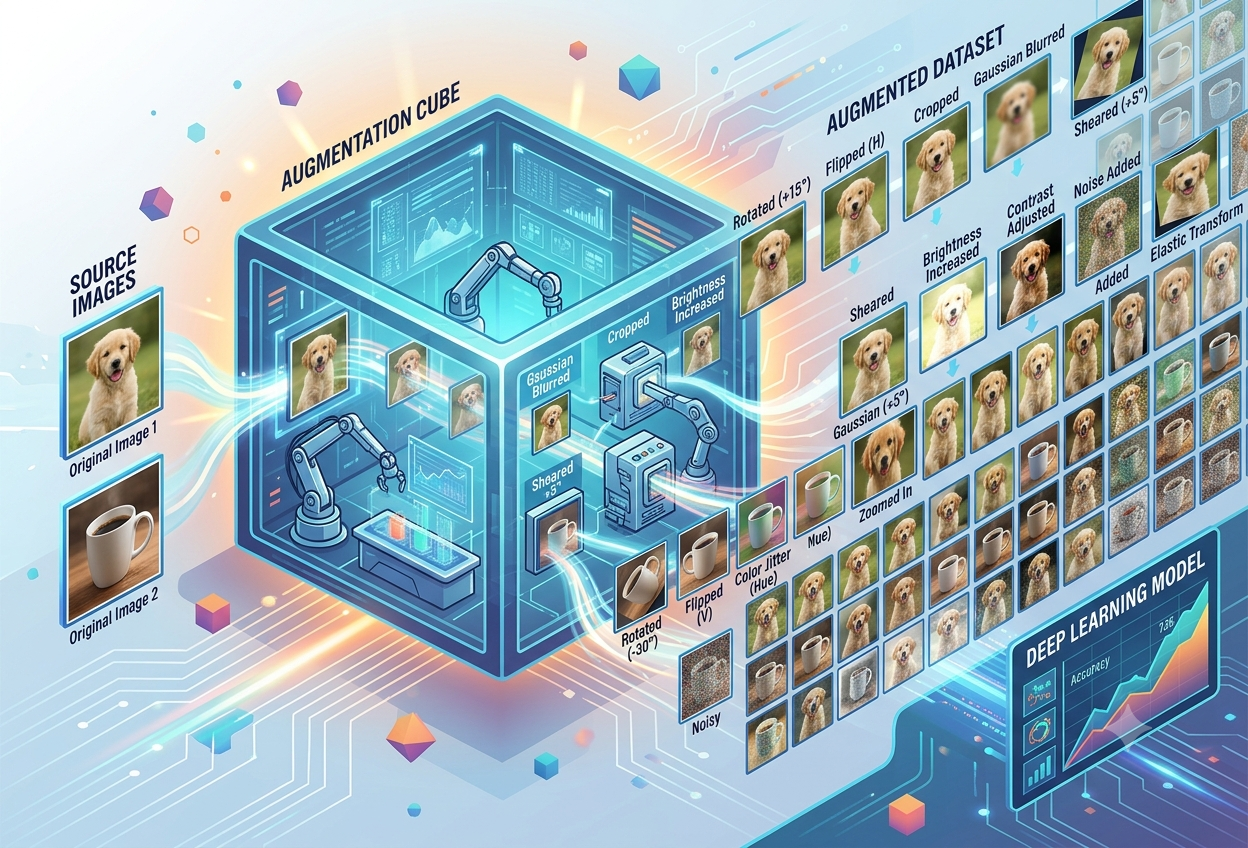
Imagine you have exactly one photograph of your dog. Now imagine a friend asks you to describe what your dog looks like from every possible angle, in every kind of light, sitting, standing, half-hidden behind a sofa. You only have one picture — but what if you could twist, flip, brighten, and reshape that single photo into a hundred different-looking versions, all still clearly showing the same dog? That, in a nutshell, is data augmentation.
“Data augmentation is the technique to artificially increase the diversity in a training dataset by using various types of transformations — without ever stepping outside to take a single new photo.”— Adapted from computer vision research literature, 2025
In the world of artificial intelligence, computer programs called models learn to recognise pictures the same way a small child learns to recognise a cat: by looking at lots and lots of examples. The trouble is, gathering enough real-world photographs — thousands or even millions of them — is slow, expensive, and sometimes simply impossible. Data augmentation solves this by taking the images you already have and creating brand-new, slightly altered copies of them through computer-made transformations such as rotating, flipping, cropping, recolouring, or blurring.
Each new copy still shows the same object — a cat is still a cat even if it is rotated by fifteen degrees or made slightly darker — but to the computer, every transformed copy looks like a fresh example it has never seen before. This tricks the model, in the best possible way, into learning the real underlying concept of “cat” rather than memorising one specific photograph of one specific cat.
Imagine you have one photo of a balloon. If you photocopy it, then turn the copy upside down, stretch another copy sideways, make one copy darker and one copy brighter, you suddenly have five “different-looking” balloon pictures from just one original. A computer does the exact same trick — except it can make thousands of these copies in seconds, and it does this so that it gets really good at recognising balloons no matter how they are tilted, lit, or shaped in a brand new photo it has never seen.
Two Different Ideas People Often Mix Up
Before going further, it helps to separate two terms that sound alike but mean different things. Augmented data starts from a real photograph and applies a transformation to it — the dog in the picture is a real dog, just viewed differently. Synthetic data, on the other hand, is built entirely from scratch by a generative computer program, with no real underlying photograph at all — think of a completely computer-imagined dog that never existed in any camera’s memory card.
A real, existing photograph that has been rotated, flipped, recoloured, cropped, or otherwise transformed while keeping its original subject intact.
An entirely computer-generated image with no original real-world photograph behind it — created by algorithms that have learned what realistic images look like.
Modern pipelines often combine both — starting from real photos, then using generative models to push variety even further than simple transformations allow.
This guide focuses mainly on the first idea — image data augmentation — while also covering how the newest, AI-powered methods are starting to blur the line between the two.
Why Data Augmentation Matters So Much
Deep learning models are hungry. They do not just want data — they want enormous, varied, endless amounts of it. Without enough food, they develop a very specific and very common illness called overfitting. Data augmentation is, in many ways, the cheapest and most reliable medicine for that illness.
The Overfitting Problem
Picture a student who is preparing for an exam by memorising the exact wording of twenty practice questions, word for word, instead of understanding the underlying concepts. On exam day, if even one question is phrased slightly differently, the student panics — they memorised answers, not ideas. A machine learning model trained on too little or too narrow data does exactly this. It memorises the specific pixels of the training photographs rather than learning the general shape, texture, and structure of “cat” or “car” or “tumour.” When it is then shown a brand-new photograph it has never seen, its performance falls apart. This gap between how well a model performs on training data versus on new, unseen data is what researchers call poor generalisation.
The Cost and Pain of Collecting Real Data
Gathering brand-new, high-quality, correctly labelled photographs is far harder than it sounds. Consider a hospital trying to train a model to spot a rare disease on X-rays: there may be only a few hundred confirmed cases in the entire hospital’s history, and each one needs a trained doctor to label it correctly. Or consider a self-driving car company that needs footage of black ice on a highway at night — a dangerous, rare, and expensive scenario to film safely on purpose.
Recording, organising, and labelling thousands of images by hand can take weeks or months of dedicated human effort.
CostSpecialised cameras, expert annotators, and rare real-world scenarios all add up to a significant financial cost.
CostLaws like GDPR restrict how much real personal or medical image data can be collected and shared in the first place.
LegalSome things — rare diseases, factory defects, extreme weather — simply do not happen often enough to photograph at scale.
ScarcityBigger, more diverse training datasets reliably produce better-performing models — this is one of the most repeated lessons in modern machine learning. But assembling such datasets the traditional way, photograph by photograph, simply does not scale. Data augmentation lets a small team multiply the value of every single photograph they already own, instead of being stuck waiting and paying for more.
Distribution Shift: A Sneakier Problem
How Data Augmentation Actually Works
At its heart, data augmentation rests on one golden rule: change the picture, but never change what it truly is. A rotated photo of a cat is still, unmistakably, a photo of a cat. This rule is so important that researchers have a name for it — label-preserving transformation.
The Golden Rule: Keep the Label, Change the Pixels
Every augmentation technique takes an original image together with its label (the correct answer, such as “cat,” “tumour,” or “stop sign”) and applies some mathematical transformation to the pixels of the image while leaving the label untouched. The computer’s job, when training, is to learn to recognise “cat” even as the actual pixel values shift dramatically underneath that unchanging label.
Two Broad Families of Transformation
Almost every basic augmentation technique can be sorted into one of two large families, based on what part of the image it changes.
Alter the spatial layout of the image — where things sit, how big they are, and which direction they face. Rotation, flipping, cropping, scaling, and translation all belong here.
Alter the colour and lighting properties of the image without moving anything — brightness, contrast, saturation, and hue adjustments all belong here.
Beyond these two foundational families sit more advanced techniques — kernel filters that sharpen or blur, erasing methods that hide parts of the image, mixing techniques that blend two images into one, and fully generative AI methods that invent pixels that never existed in any camera. Each of the following sections walks through one of these families in depth.
Where Augmentation Fits in the Bigger Pipeline
Data augmentation is not a standalone tool used in isolation — it is one careful step inside a much larger machine learning pipeline. Crucially, augmentation is almost always applied only to the training portion of a dataset, after the data has already been split into training, validation, and test sets. Applying augmentation before this split, or applying it to the validation and test sets, is considered a serious mistake because it can leak information and produce misleadingly optimistic results.
Geometric Transformations
Geometric transformations are the oldest, simplest, and still most widely used family of augmentation tricks. They move, spin, stretch, or slice an image without touching a single colour value — like physically picking up a printed photograph and turning, flipping, or trimming it with scissors.
The Core Geometric Techniques
| Technique | What It Does | What It Teaches the Model |
|---|---|---|
| Rotation | Spins the image around its centre by a chosen angle, such as 15°, 90°, or a random amount. | To recognise an object regardless of which way it is tilted. |
| Flipping | Mirrors the image left-to-right (horizontal) or top-to-bottom (vertical). | That an object looks the same — or still makes sense — when viewed as a mirror image. |
| Scaling / Zoom | Shrinks or enlarges the image while usually keeping its overall proportions. | To recognise objects at different sizes and distances from the camera. |
| Translation | Shifts the entire image a few pixels left, right, up, or down. | That an object is still the same object even if it is not perfectly centred in the frame. |
| Shearing | Slants the image along an axis, similar to tilting a stack of paper sideways. | To handle skewed camera angles and perspective distortion. |
| Cropping | Cuts out and keeps only a smaller rectangular section of the original image. | To focus on the object itself rather than relying too much on background context. |
Think of holding up a printed photo of your favourite toy. If you spin it round, hold it up to a mirror, walk it closer or further from your eyes, slide it sideways, tilt it, or zoom in on just a corner of it with your hands — your toy is still the same toy in every single case. You just changed how you are looking at it, not what it actually is. That is exactly what geometric transformations do for a computer.
A Word of Caution: Not Every Transformation Makes Sense Everywhere
Geometric transformations are powerful, but they are not blindly safe to apply to every kind of image. Context matters enormously. A photo of a stop sign flipped upside-down would teach a self-driving car a dangerously wrong lesson, since stop signs never legitimately appear upside-down on real roads. Similarly, rotating a digit-recognition dataset by 180 degrees can quietly turn a “6” into a “9” while keeping the old “6” label attached — silently teaching the model something false. Medical X-rays, too, usually have one single, medically consistent orientation, so flipping them carelessly can introduce confusing, unrealistic training examples rather than helpful ones.
“Your transformations don’t have to be exclusively realistic, but you should definitely be using any transformations that are likely to occur in practice.”
— Computer vision engineering guidance, adaptedColor & Photometric Transformations
If geometric transformations are about moving things around, photometric — or colour space — transformations are about changing how things look under different light. They never move a single pixel out of place; they only repaint the colours and brightness values already sitting there.
The Core Photometric Techniques
- Brightness adjustment: Makes the entire image lighter or darker, simulating sunny days, shaded rooms, or dim indoor lighting.
- Contrast adjustment: Widens or narrows the gap between the darkest and lightest parts of an image, simulating different camera sensors or overcast skies.
- Saturation adjustment: Turns colours more vivid and intense, or more washed-out and grey, simulating different camera settings or weather conditions.
- Hue adjustment: Shifts every colour around the colour wheel — reds drifting toward orange, blues drifting toward purple — simulating colour-cast differences between cameras and white-balance settings.
- Grayscaling: Removes colour information entirely, forcing the model to rely on shape, texture, and brightness patterns alone.
- Noise injection: Sprinkles small random speckles of light and dark pixels across the image, mimicking the graininess of a cheap camera sensor or a poor-quality photo.
Think about taking a photo of your favourite toy at noon under bright sunlight, then taking another photo of the exact same toy at sunset, and another one inside a dim room with the curtains closed. The toy never changes — only the light around it does. Photometric transformations let a computer practise recognising things under all sorts of different lighting, without anyone needing to actually carry the toy outside three separate times.
Why This Matters in the Real World
Kernel Filters & Erasing Methods
Some of the cleverest augmentation tricks do not move or recolour an image at all — they either soften and sharpen its details, or deliberately hide pieces of it. Strange as it sounds, teaching a model to cope with missing or blurry information turns out to be one of the most useful lessons of all.
Kernel Filters: Blurring and Sharpening
A kernel filter is a small mathematical sliding window that passes over every pixel of an image, blending it with its neighbours according to a fixed pattern. Depending on how that pattern is designed, the result can soften the entire image (blurring) or exaggerate its edges (sharpening).
Smooths out fine detail, simulating an out-of-focus camera, motion blur, or a foggy, hazy day.
Exaggerates edges and fine detail, helping a model learn to recognise objects even from crisp, high-contrast images.
Highlights only the outlines of objects, stripping away colour and texture to emphasise pure shape.
Erasing Methods: Teaching a Model to Cope With “Missing Pieces”
Real-world photographs are rarely perfect. A tree branch might hide half a dog’s face; a crowd of people might block part of a parked car; a smudge on the camera lens might obscure a corner of the picture. Random erasing and its close cousin cutout deliberately recreate this messiness by blacking out, greying out, or replacing a randomly chosen rectangle (or several) inside the training image — forcing the model to recognise the object using only its remaining, visible parts.
Masks a single square region of the image with a constant colour, teaching the model not to over-rely on any one distinctive feature (such as only ever looking at a dog’s face and never its tail).
Similar to cutout, but the erased region’s size, position, and even fill colour can all vary randomly, adding even more diversity to the occlusion patterns the model encounters.
Removes a structured, repeating grid or stripe pattern across the image rather than one single block, spreading the “missing information” challenge more evenly.
Splits the image into a grid of patches and randomly hides a subset of them each time, encouraging the model to use many different parts of the object for recognition.
Imagine playing a guessing game where your friend covers part of an animal picture with a sticky note and asks you to guess what it is anyway. If they always cover the same spot, you might only ever learn to recognise the parts that are never hidden. But if they cover different random spots each time — sometimes the ears, sometimes the tail, sometimes the nose — you get much better at recognising the whole animal from any visible clue. That is exactly what random erasing teaches a computer.
Mixing Images Together
This next family of techniques sounds almost mischievous: instead of transforming one image at a time, why not blend two completely different images into a single, strange new picture? Counterintuitive as it sounds to a human eye, this approach has repeatedly been shown to genuinely help models learn smoother, more reliable patterns.
Mixup: Blending Two Photos Like a Double-Exposure
Mixup takes two training images and combines them through a weighted average of their pixel values — much like an old-fashioned double-exposure photograph where two scenes appear to overlap, one slightly ghostly behind the other. The corresponding label is blended in exactly the same proportion. If an image is 70% “dog” pixels and 30% “cat” pixels, its label becomes a soft mixture as well, instead of a single hard answer.
CutMix: A More Realistic Cousin of Mixup
CutMix takes a different approach. Rather than ghostly blending two whole images together, it cuts a rectangular patch from one image and pastes it directly onto another — like sticking a photo cut-out collage. The label is weighted according to how much of the final image’s area comes from each source picture. Because the pasted patch contains real, sharp information rather than a faded blend, CutMix tends to produce more realistic-looking training images than Mixup.
AugMix: Mixing Transformations of the Same Image
AugMix takes yet another twist: instead of mixing two different photographs, it mixes several different augmented versions of the very same photograph, then blends that result back with the original image one more time. This keeps much of the benefit of “mixing” — exploring the space between different visual variations — while avoiding the strangeness of combining two unrelated objects.
Mosaic: A Favourite of Object Detectors
Mosaic augmentation, popularised by the YOLO family of object-detection models, stitches four different training images together into one single large image arranged in a 2×2 grid. This is especially useful for object detection tasks, since it teaches a model to find and recognise objects at dramatically different scales and in cluttered, busy scenes — much like a real photograph might contain several objects of different sizes at once.
It seems strange that a hazy, half-transparent blend of a dog and a cat could teach a model anything useful — after all, no human would call that picture “52% dog.” But the goal is not to create a realistic photo. The goal is to encourage the model to behave smoothly and predictably between categories, rather than making wild, overconfident jumps. Models trained this way tend to be noticeably more stable and harder to fool when faced with confusing or borderline real-world images.
Quick Comparison
| Technique | How It Combines Images | Best Known For |
|---|---|---|
| Mixup | Weighted pixel-by-pixel average of two whole images | Smoother decision boundaries, image classification |
| CutMix | Pastes a rectangular crop from one image onto another | More realistic blends, strong classification results |
| AugMix | Mixes several augmented versions of the same image | Robustness without unrealistic cross-class blending |
| Mosaic | Stitches four separate images into one 2×2 grid | Object detection at varied scales (e.g., YOLO models) |
AI-Powered Augmentation
Everything covered so far has been a fairly simple, rule-based transformation — rotate this much, blur that much, mix these two together. The newest frontier of data augmentation hands the job over to other AI systems entirely, letting one model invent entirely new training material for another model to learn from.
Generative Adversarial Networks (GANs)
A GAN is really two competing neural networks locked in an ongoing contest. One network, the generator, tries to create fake images realistic enough to pass as genuine. The other network, the discriminator, tries to catch the fakes. Round after round, the generator gets better at fooling the discriminator, and the discriminator gets better at catching fakes — and through this constant back-and-forth competition, the generator eventually becomes remarkably good at producing convincing, brand-new synthetic images.
Variational Autoencoders (VAEs)
A VAE works a little differently. It contains an encoder, which compresses an image down into a compact mathematical summary, and a decoder, which expands that summary back out into a full image again. By nudging the compact summary slightly before decoding it, a VAE can produce new images that resemble the original data closely while still introducing fresh variation — useful for adding diversity without losing the core statistical character of the original dataset.
Neural Style Transfer
Neural style transfer uses the layered structure of convolutional neural networks to separate an image’s content (what objects are present and where) from its style (textures, colour palettes, and artistic feel). It can then recombine the original content with an entirely different style, producing fresh-looking training images that still represent the same underlying subject.
Feature-Space Augmentation
Rather than tweaking the raw pixels at all, this technique works on the hidden, internal mathematical representation a neural network builds partway through processing an image. By adding small amounts of noise or blending within this internal “feature space,” researchers can generate variation that the pixel-level techniques covered earlier might never stumble upon.
Automated Augmentation: Letting the Computer Choose
With so many techniques now available, a natural question arises: which combination actually works best for a specific dataset and task? AutoAugment and similar automated search methods use reinforcement learning to systematically test different augmentation policies and discover which sequence of transformations yields the highest accuracy for a particular dataset — effectively letting the computer run its own carefully controlled experiments rather than relying on a human’s best guess.
It’s worth returning to the distinction raised earlier. GANs and VAEs sit right on the boundary between augmentation and pure synthetic data generation. When they start from and lightly vary real images, they behave like augmentation. When they generate entirely new images from random noise with no specific real photo behind them, they cross over into synthetic data territory. Research comparing models trained on synthetic versus real data shows mixed results — sometimes synthetic data helps enormously, sometimes it underperforms real data — and the consistent finding is that synthetic data works best when it closely reflects the genuine statistical character of real-world data.
Offline vs. Online Augmentation
Knowing which transformations to apply is only half the story. Engineers also need to decide exactly when and how those transformations happen during training — and there are two fundamentally different strategies for doing this.
Offline Augmentation: Build It Once, Save It to Disk
In offline augmentation, every transformed copy of every image is generated once, in advance, and saved permanently to a hard drive alongside the originals. Training then proceeds using this larger, fixed, pre-built collection of images. The major drawback is storage: turning one image into fifty augmented copies multiplies disk space requirements by fifty, which can become impractical very quickly for large datasets.
Online Augmentation: Transform On the Fly
Online augmentation — by far the more common approach in modern deep learning — generates a fresh, randomly transformed version of each image at the exact moment it is about to be shown to the model during training, and then immediately discards it afterward without ever saving it to disk. This means the model effectively sees a slightly different version of the same photograph every single time it encounters it, multiplying the effective diversity of the dataset without ever multiplying its actual storage footprint.
✓ Online Augmentation — Advantages
- Negligible extra storage required
- Model sees a virtually unlimited variety over many epochs
- Easy to adjust transformation strength during training
- The standard, default approach in most modern frameworks
✗ Offline Augmentation — Trade-offs
- Storage requirements multiply quickly with each added copy
- Useful mainly for verifying augmented image quality by eye
- Useful when exact reproducibility of a fixed dataset matters
- Less commonly the default choice in production pipelines
Real-World Applications
Data augmentation is not a purely academic exercise tucked away in research papers — it quietly powers a huge number of AI systems people interact with every day, often in industries where collecting more real data is especially hard, slow, or sensitive.
Healthcare & Medical Imaging
Rare diseases often have only a handful of confirmed, correctly labelled scans available anywhere in the world. Augmenting X-rays, MRIs, and skin lesion photographs — through careful rotation, cropping, and contrast adjustment — helps diagnostic models learn from limited real cases without compromising patient privacy, since no new patients need to be scanned.
Self-Driving Cars
Filming a car driving through black ice, sudden fog, or a dangerous near-miss on purpose is unsafe and impractical. Simulated and augmented driving footage — adjusting lighting, weather effects, and camera angles — lets autonomous vehicle systems practise for rare, hazardous scenarios entirely offline before ever facing them for real.
Manufacturing & Quality Inspection
Factory defects — a scratch, a dent, a misaligned part — are thankfully rare on a well-run production line, which paradoxically makes them hard to photograph in large numbers. Augmenting the limited defect photographs that do exist (through rotation, lighting changes, and synthetic defect insertion) helps inspection models catch flaws reliably without needing thousands of real faulty products.
Retail & E-Commerce
A single product photograph taken in a clean studio rarely resembles how that same product looks photographed by a customer’s phone in a dim living room. Augmenting catalogue images with varied lighting, backgrounds, and angles helps product-recognition and recommendation models work reliably across very different real-world photo conditions.
Other Notable Use Cases
- Finance and fraud detection: Synthetic and augmented examples of rare fraud patterns help models learn to spot fraud more reliably, since genuine confirmed fraud cases are naturally scarce.
- Agriculture: Augmented photographs of crop diseases and pest damage, taken under varied lighting and weather, help models monitor farmland health from drone or phone cameras.
- Security and surveillance: Augmenting footage with different lighting and noise levels helps recognition systems perform consistently across both daytime and poorly lit night-time conditions.
- Satellite and aerial imagery: Rotational and scale augmentation helps models recognise roads, buildings, and natural features regardless of a satellite’s viewing angle or altitude.
“With big data, convolutional networks have shown to be very powerful for medical image analysis tasks such as brain scan analysis or skin lesion classification.”
— Computer vision research summary, adaptedDoctors who study very rare illnesses might only have a few dozen real photographs of that illness in the whole world. By spinning, brightening, and gently reshaping those few photographs, computer scientists can give the computer many more “practice pictures” to learn from — almost like giving a student extra practice worksheets made from the same handful of real exam questions, just rearranged and restyled each time.
Pros, Cons & Common Pitfalls
Data augmentation is enormously useful, but it is not magic, and it is not entirely without risk. A clear-eyed look at both its strengths and its limitations is essential before relying on it for any serious project.
✓ Genuine Advantages
- Reduces overfitting and improves generalisation to new data
- Dramatically cheaper than collecting and labelling new photographs
- Helps balance datasets where some categories have far fewer examples
- Makes models more robust to lighting, angle, and noise variation
- Protects privacy by reducing reliance on additional real personal data
✗ Real Limitations
- Any bias already present in the original data is preserved and copied
- Cannot invent genuinely new contexts the original photos never captured
- Some transformations can quietly produce mislabelled or unrealistic data
- Quality-checking large volumes of augmented images is itself costly
- Diminishing returns once a dataset is already very large and diverse
The Bias Trap
This limitation deserves special attention because it is so easy to overlook. If an original dataset of faces, for example, contains very few examples of a particular skin tone, rotating, flipping, and recolouring those same few examples will multiply their number — but it will not create the genuine diversity that real, additional photographs of underrepresented groups would provide. The bias was there first; augmentation can only copy it forward, not correct it. Addressing bias at its root, in the original data collection process, remains essential and cannot be skipped by leaning on augmentation alone.
Common Pitfalls to Avoid
- Applying augmentation before splitting data into training, validation, and test sets — this leaks information and produces falsely optimistic results.
- Using geometric flips or rotations on data where orientation has real meaning, such as traffic signs, certain medical scans, or handwritten digits.
- Chaining too many transformations onto a single image at once, producing a result so distorted it no longer resembles anything realistic.
- Cropping or translating so aggressively that the actual object of interest is accidentally cut out of the frame entirely.
- Forgetting to apply matching transformations to bounding boxes or segmentation masks when doing object detection or segmentation tasks.
- Assuming augmentation can substitute entirely for real, diverse data rather than complementing it.
Data augmentation cannot turn a genuinely tiny dataset of fifty images into the equivalent of a rich, diverse, real-world dataset of fifty thousand images. It excels at making a model more robust to rotations, lighting, and minor distortions — but it cannot manufacture variety in backgrounds, perspectives, or object appearances that were never present anywhere in the original photographs to begin with.
Best Practices: How to Choose the Right Techniques
With so many augmentation techniques on offer, how does anyone decide which ones to actually use for a specific project? The good news is that experienced practitioners rely on a fairly consistent set of guiding questions rather than guesswork.
Start by Asking: “Could This Realistically Happen?”
The single most useful filter is realism. Would the transformed image plausibly occur in the real-world environment where the finished model will actually be used? A slightly rotated photo of a tree is perfectly plausible — trees lean, cameras tilt. An upside-down stop sign is not plausible on any real street and should likely be avoided for that specific task, even though the same flip might be perfectly fine for, say, a general object-recognition dataset of household items.
A Sensible Starting Toolkit
For most everyday image classification projects, a small, well-tested combination is enough to begin with: horizontal flipping, modest random cropping, slight blurring or noise injection, and one erasing technique such as cutout. From this solid baseline, additional techniques can be layered in gradually while carefully watching validation performance after each change.
Know Your Domain
Medical scans, satellite images, and handwritten text each have their own rules about which transformations preserve meaning and which quietly destroy it.
Know Your Dataset
Understanding the existing spread of lighting, angles, and backgrounds in your data reveals which augmentations will genuinely add diversity versus which are redundant.
Experiment, Don’t Guess
Validate every augmentation choice empirically on a held-out validation set rather than relying purely on intuition about what “should” help.
Match the Task
Object detection and segmentation tasks require transforming bounding boxes and masks alongside the image — classification tasks generally do not.
Tune the Strength
A small amount of brightness change helps; an extreme amount can make an image unrecognisable even to a human. Moderate, realistic ranges work best.
Prefer Online by Default
Unless there is a specific reason to need a fixed, saved dataset, online augmentation generally offers the best balance of diversity and efficiency.
What the Pros Actually Use
Looking at well-known, state-of-the-art computer vision models offers a useful reality check. Early networks like AlexNet relied on simple flips and colour jitter. Object detectors like YOLO progressed to scale, colour space, and eventually Mosaic augmentation. Modern vision transformers commonly combine RandAugment, Mixup, CutMix, and random erasing all together. The clear pattern across this history is gradual, validated escalation — researchers rarely jump straight to the most exotic combination of techniques without first confirming simpler ones work.
There is no single “correct” augmentation recipe that works for every dataset and every task. The most reliable process is iterative: start simple, measure validation performance carefully, add one new technique at a time, and keep only the changes that demonstrably help. Augmentation is a tool to be tuned, not a checklist to be blindly completed.
The Road Ahead for Data Augmentation
Data augmentation has quietly grown from a handful of simple tricks — flip the image, rotate it a bit — into a rich, active field of research in its own right. Where is it heading next?
Trends Shaping the Future
As GANs, diffusion-style generative models, and large multimodal AI systems keep improving, more augmentation will shift from simple pixel transforms toward AI-generated variations that are increasingly difficult to distinguish from real photographs.
TrendAutomated methods like AutoAugment are becoming faster and more efficient at discovering the ideal augmentation recipe for a specific dataset, reducing the manual trial-and-error currently required of engineers.
TrendThe same underlying philosophy — transform without losing meaning — is increasingly being applied to text, audio, video, and even combinations of these modalities together.
TrendRather than applying one blanket policy to an entire dataset, newer research tailors augmentation differently for each class or even each individual training example, based on what that specific data most needs.
TrendOpen Questions That Remain
- The bias question: Researchers are still working out how to detect and reduce bias amplification when augmenting already-imbalanced datasets, rather than simply multiplying existing imbalances.
- The synthetic data question: It remains an open and active research area to understand exactly when fully AI-generated synthetic images help versus when they quietly hurt model performance.
- The evaluation question: Comparing augmentation strategies fairly across different datasets and tasks is harder than it sounds, and standardised benchmarking is still maturing.
- The efficiency question: As generative augmentation grows more computationally expensive, balancing quality against training-time cost remains a genuine engineering trade-off.
“More data equals a better model. Data augmentation equals more data. Therefore, data augmentation equals better machine learning models.”
— A simple but enduring engineering heuristicData augmentation will likely never fully replace the value of real, diverse, carefully collected data — but it has firmly established itself as one of the most cost-effective, broadly applicable tools available for building computer vision systems that work reliably in the messy, unpredictable real world. From a single rotated photograph to an entire GAN-generated synthetic dataset, the underlying goal has stayed remarkably consistent across a decade of research: teach the model the real pattern, not just the specific pixels it happened to see first.
Practical breakdown of geometric, colour, and kernel-filter augmentation techniques with Python implementation examples.
Industry overview covering overfitting reduction, data warping versus oversampling, and computer vision challenges.
In-depth explainer distinguishing augmented from synthetic data, with coverage of image, text, and automated augmentation research.
Detailed technical guide covering Mixup, CutMix, AugMix, offline versus online augmentation, and pitfalls to avoid.
Tutorial-style guide spanning audio, text, and image augmentation, plus the ethical implications of augmenting biased datasets.
Hands-on notebook demonstrating practical image augmentation workflows for convolutional neural network training.
Technique-by-technique walkthrough with code examples for common image augmentation methods.
Academic research paper proposing novel pairwise channel transfer, occlusion, and masking augmentation techniques, benchmarked on Caltech-101.
Cloud-provider explainer covering use cases across healthcare, finance, and retail, plus the role of GANs and VAEs.
Accessible narrative explainer introducing core data augmentation concepts for newer practitioners.
Comprehensive reference covering augmentation strategy selection across multiple machine learning domains.
Computer vision platform guide covering practical augmentation pipeline design for production systems.
Explains the role of augmentation within a broader computer vision preprocessing pipeline.
Technique-focused overview of common image augmentation methods used in deep learning projects.